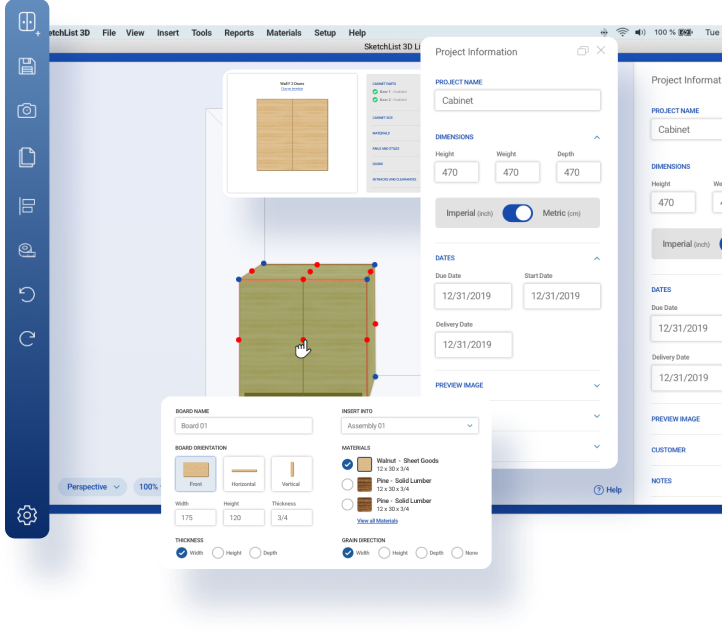






SketchList 3D Will Help Your Business
SketchList 3D Professional:
- Allows you to compete more effectively.
- Increases sales and profits.
- Involves prospects with proposal preparation.
- Wins more high end business.
- Takes hours off your proposal preparation time.
- Increases the professionalism of your proposals.
- Automatically generates parts lists, cutting layouts, purchase lists, and drawings.
- Reduces mistakes and minimize material waste.
- Saves time.
Video Overview
Go To Videos
Links
SketchList 3D helps you create better designs, easily explore alternative designs, communicate more effectively with prospects, modify the proposed designs before going to the prototype or shop stage, prepare better estimates, reduce material waste, and significantly cut the time required to go from concept to shop. You can create a fresh design for every situation or copy existing work into new projects.
You can do it! SketchList 3D requires a small time investment to learn.
Some users design their first project in one day. SketchList 3D includes a library of sample projects, a detailed manual, and a series of online videos and tutorials to help you learn. We are here to answer your questions, help solve your problems, and even link with you online to discuss and review your designs. Our goal is to get you productive as soon as possible so you can be about your business.
System Requirements
- Microsoft Windows XP, Vista, Windows 7 or Windows 8 installed and configured on a PC.
- MAC .
- Core2Duo Processor
- 4 GB of RAM
- Nvidia/Ati GPU
- 60 MB of free hard disk space
- Initial registration requires an Internet connection
- Automatic bug fixes are free and require an Internet connection
Latest News
-
Changing all materials in cabinet design software
Posted on November 2, 2012 | No CommentsBack when we started planning for version three incremental (V3i) we did a survey asking for new feature ideas. We came up with a list of features which were significant... -
Stretch only a part of the cabinet with your design software
Posted on October 17, 2012 | No CommentsThe newest features of SketchList 3D 3vi include the ability to use the cabinet design software to stretch existing assemblies. One thing that is really useful, and perhaps not... -
Setup for Success in Cabinet Design Software
Posted on October 14, 2012 | No CommentsI have always been a bit crazy about more screen space on my computers. I am willing to pay a bit more and make more connections to maximize my... -
PDF 3D Images in Cabinet Design Software
Posted on September 21, 2012 | 1 CommentSomeone emailed me to tell me how valuable he finds the PDF output file or SketchList 3D Pro. Basically this feature allows you to output a 3D model of your... -
Cabinet Design Software – SketchList 3D rendering very realistic
Posted on September 18, 2012 | 1 CommentAs you probably know I send a fair amount of emails – checking up, sharing ideas, and updating on product development. This is part of an email I got in... -
Working Area Set Aside in Furniture Design Software
Posted on September 9, 2012 | No CommentsVersion 3i opens new possibilities in speeding design. I use more standard objects now than ever before. A standard object can be an assembly, board, door, drawer, or piece of... -
Version 3i – Stretch Any Assembly Any Amount Any Way
Posted on August 20, 2012 | 1 CommentThis week we will be releasing the Windows version of Version 3i. The i means incremental — new features will be available for use as they pass our internal testing.... -
Moving of Multiple Parts in Cabinet Design Software
Posted on August 1, 2012 | 2 CommentsLong ago I posted about how important it was to consider the true size of an assembly. The issue is that using our cabinet design software – SketchList 3D –... -
Relative Locations in Furniture Design Software
Posted on July 9, 2012 | No CommentsI get emails from time to time asking about how many assemblies should be in a project. More than once I’ve seen project files from users who put a single... -
Documentation for Furniture Design Software
Posted on July 1, 2012 | 4 CommentsEmail came into my office. In part it read…. “Once I figured out that entering 2 of 3 parameters on the Form would calculate the last one (as the tutorial shows) I have been...