
Dresser Design Software within SketchList 3D
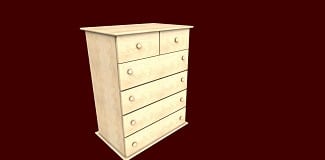
A furniture maker wrote in asking if SketchList 3D dresser design software could help him create a dresser model. I created the model from images he sent me using our dresser design software. Pretty much the whole gamut of SketchList 3D tools worked together to make the project. And that involves heavy use of red dots [resize objects], blue dots [locate objects], clone and mirror and clone and space, in addition to the align tool.
The carcass consists of five boards – left and right sides, top and bottom, and of course the back. And because the case is frameless no rails or stiles appear.
The project shows the details of putting together the drawers. While there are more videos online to show that – well this is a six drawer dresser so we made drawers for it!
I recorded the making of the dresser in a video you can watch below.
This is a desk I created with our desk design software. There are four full sized and two half sized drawers. We mounted knobs on the drawer fronts. And feet support the entire project.
The design in the video makes heavy use of SketchList 3D’s tools red dot resizing, blue dot locating, cloning, and the align function. So it provides a great review of how to use them in the dresser design tool.
Just so you know, the entire design took less than 30 minutes with our dresser design software. And that of course includes the cut list, shop drawings, and material layout diagrams.
Keep an eye out for an upcoming post where I re-do the dresser as a the SketchList 3D addon Wizard model.
If you own SketchList 3D and would like a copy of this project contact us. If you want a free 14-day trial go to www.sketchlist.com.
Here is a link to a site with more ideas on what you might make with our dresser design software.