
Kitchen Cabinet Design Software Joinery Puzzle Solved
An email from a user follows.
“Can’t seem to edit the joinery on the back of gables. Suggestions?”
This is a great user of our free kitchen design software. He communicated clearly. I asked him to export and send me the project which he did promptly. With it I was able to work with his ‘problem’ board and find the issue.
SketchList 3D sometimes has difficulty with overlapping holes. In this case the rabbet and the dado on the board surface were being set to overlap. Sometimes SketchList 3D predicts the problem and will not allow you to apply the rabbet, sometimes it issues a warning error.
The work around is to apply the rabbets to the edging before applying the dado. Then when you specify the dado length make sure it does not overlap the rabbet.
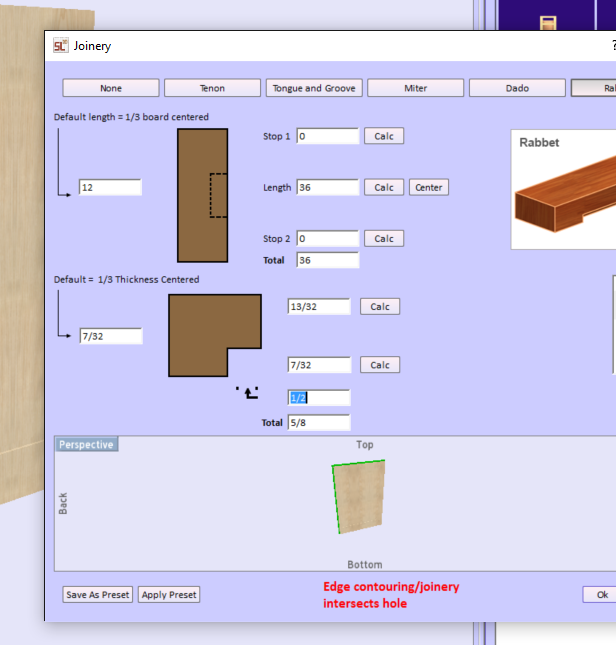
Here is the warning.
I clicked the Edit /Clone Holes button and right clicked the row for Hole1. Then I deleted it. At that point SketchList 3D would accept rabbets on both the back and top of the board.
I clicked the Dado button after selecting the surface of the board that would receive the dado.

With some distance between the rabbet and the dado SketchList 3D is able to cut both on this board.
The same process applies to shaping and contouring board edges. The rule is shape first and contour later. For example if you want to make a triangle shaped table top, select the board at board detail level [double click it]. Next select a surface and click Shape. Then delete one corner point to make the triangle. Exit the shape tool and select an edge. Click the contour button, select bull nose, and select the edges on which you want the contour. Go to assembly level and see your board.