Categories
Blog Uncategorized Version 4 Woodworking Business

Furniture Design Software – Using Slider Bars

Slider Bars to Move and Size

Ability to Slide Objects in 3D Speeds Design

Immediate visual feedback on design changes is critical to furniture  design software productivity.  The ability to try different options and ideas and instantly see their image vastly improves your design and product.

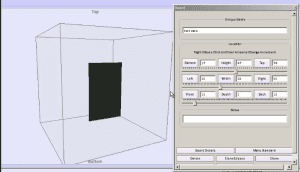
With version 4 of the SketchList 3D  furniture design software we have achieved this ability of sliding objects back and forth up and down right and left on your screen.  But more than that we’ve integrated the parametric approach of typing in specific values (for example 14 7/16 ) to get to a specific place in your three dimensional models.

This is truly a feature  which is better experienced and seen then talked about. A picture may be worth 1000 words but with the sliders with video  is worth everything.

Take a look at this video to see what I mean.

[responsive_vid]


Categories
Blog Uncategorized Version 4 Woodworking Business

Furniture Design Software – Manipulate those Assemblies

Reception Desk in Cabinet Design Software

Achieving design flexibility while saving time

With sketch list 3-D furniture design software you can  create designs that meet your customers needs. The flexibility provided by manipulating a virtual boards on the screen, along with the instant visual feedback  of the shape and proportion of your the design allow you to explore many  alternative approaches for your design.   Because it is quick to design using this virtual board concept you can accomplish a lot in the minimum amount of time.

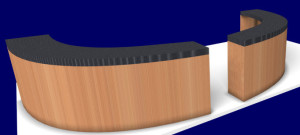
One powerful addition to the SketchList 3D toolbox is the clone and mirror function.  What it does is to make an exact copy of an assembly with one exception.  That exception being that everything  in the assembly is changed left to right.  Take a look at the reception desk in the image beginning of this post.  The reception desk started as one unit  – that towards the left-hand side  – that was curved and shaped as a bit of a quarter circle  desk.  Cloning and mirroring the first assembly allowed the design to go from a quarter circle to a semi-circle in two mouse clicks – literally taking a second or two.

A commonly used application of clone and mirror is an entertainment or bookshelf unit. You may create one assembly with,  for example,  doors to the left and shelves to the right.  For the second assembly  you want to  put the doors on the right and the shells to the left. You have three choices.

  1. You can completely rebuild the entire assembly.
  2. You can clone the us existing assembly and manually move the doors and shelves.
  3. Or you can choose clone and mirror.  after the clone and mirror of course you need to slide the assembly to the right or left to locate it where desired.

This video shows how I cloned and mirrored the quarter circle  reception desk turning it into a semi circular unit.   One of the key advantages of using  software for your furniture design efforts  the ability to  save time while  exploring many alternative designs to achieve the best  solution for your customer.


Take a look….


Categories
Blog Uncategorized Version 4

Furniture Design Software – An Approach to Manage Material

Furniutre Design - Optimized cutting Diagram

About a year ago we conducted a series of surveys both written and telephone of the existing SketchList 3D users and people who attested SketchList 3D and for whatever reason chose to purchase a license.  we found that new users had difficulty with two or three key SketchList 3D concepts. For version 4 of SketchList 3D we focused our design and programming efforts to eliminate these stumbling blocks or bottlenecks.

One of the major innovations in Version 4 has to do with the way we handle materials for boards and other parts of your designs.  In this type of furniture design software we want to provide maximum flexibility to both speed design and encourage creativity.  We found in talking to users that the requirement in version 3 to define and establish a specific material size before the design process began was a hindrance.

It was, as you may know, that if you need a specific board that is a different size than the materials already defined in your database you must leave the design process go into the material database and defined a new material.    In version 4 of SketchList  3D you need not do this.

First of all boards are not tied to an existing material size during the design stage.  Assigning a particular board or group of boards to a material size is now done during the optimization process.  So you can create any size  board in your design without concern or constraint imposed by a specify material size.  This means for example if you were working with 1 inch stock and needed a 3 inch piece for part of your design you simply change the thickness from 1 to 3 without any concern about the material database. Again this will be rectified in the optimization stage.

The only attributes you need to assign to a material are its grain texture, grain direction, and degree of transparency.   This can be done in integrated fashion within the design process.

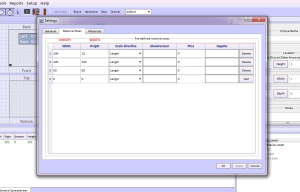
Of course in the real world  there are definite size limits materials you can procure from a supplier.   When you set up your SketchList 3D you can enter a list of available material sizes.   SketchList 3D  will use these during optimization to make sure the layouts agree with materials you can actually obtain. During that set up stage you can also specify suppliers, manufacturers, and cost.

One of the side benefits of this new approach is that you can add  scrap pieces to the optimization process. For example if you have a partial sheet of expenses material you can edit to the available material for a specific project SketchList 3D will use that piece in the optimization.

For experienced SketchList 3D users it will take a bit to get used to these new concepts.  New users have no frame of reference and feel it should have always been this way.

Take a look at this video to get a better understanding of the process.

As always get in touch if you have any questions or comments.


Dave