Video Tutorials

Fence Design Software paints a picture of what you are selling.

Fence design software can paint pictures for your prospects.  And you probably know that a picture is worth a thousand words.  Maybe it’s even worth a few thousand dollars…

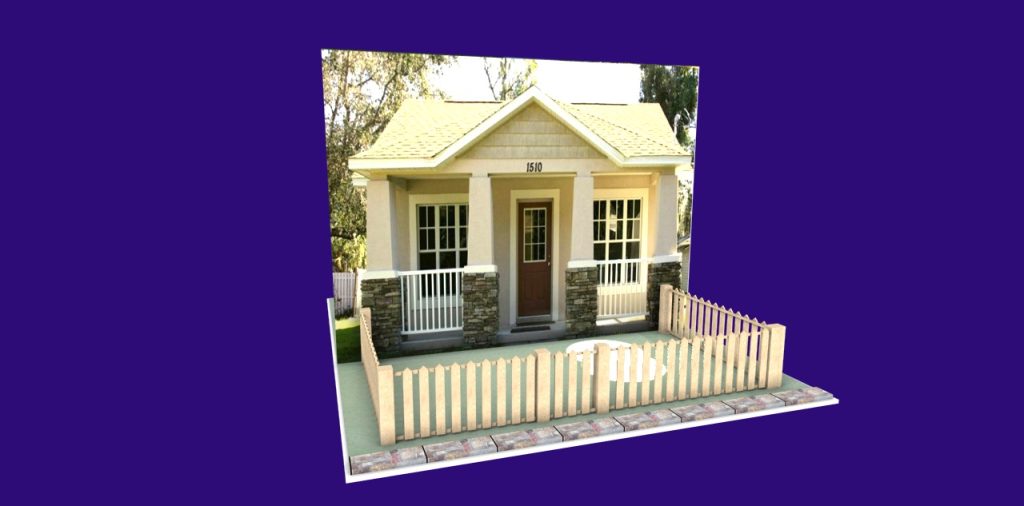
Compare these two images.

Fence Design Software fence in 2D drawing -

A simple 2D line drawing.

Fence Design Software cottge with fence

A 3D model imposed over a photograph of the prospect’s cottage.

Which picture helps the sale more?  Of course. And if I knew more about how to design fences – the photo would be even more realistic.

It took me about 30 minutes to do this model.  Remember those 30 minutes also gave me all the reports, layouts, drawings, and material cost estimates I need to plan and bid the job [if I was a fence maker – which I am not!].

Save time.  Sell jobs. Increase profits.

Price of the software – the Pro version is $750 but is available for a short time with a steep discount.

Time to implement – Pro users will get two free online training sessions to get them going.   FREE.  People consistently tell us that they feel comfortable after the first hour.  Some never call back to the second session.

Fence Design Software isn’t all you can do.  Cabinets, wall units, kitchens, mantles, pergolas — really you can design almost anything you can build.

If you have been thinking about design software to enhance your business – give me a call or shoot me an email.   I’d be more than happy to set up a training session with you.


Author

SketchList began out of frustration with other CAD programs not meeting the woodworkers needs. Initially marketed to hobby users, the vast percentage of our users turned out to be professionals. Our goal is to make powerful design software for woodworkers and will improve their work and their businesses.

Related Articles

Blog

·

4 min

Cabinet Software Pricing Guide

A thoughtful cabinet software pricing guide and evaluation goes far beyond spotting the lowest number on a page. It’s about...

Basics and How toBlogUncategorized

·

3 min

How Cabinet Design Software Is Transforming Woodworking

In the world of woodworking, precision is everything. Whether you’re crafting a custom kitchen, building a bespoke entertainment center, or...

BlogWelcome

·

4 min

The Complete SketchList 3D Setup Guide: 9 Steps to Master Woodworking Design Software

SketchList 3D is designed for woodworkers of any level of computer experience. You don’t need CAD training or special software...

SketchList 3D

Bring Your Woodworking 
Projects to Life

Our woodworking design software helps you turn time-consuming and frustrating processes into streamlined, enjoyable projects that support creative and high-quality outcomes. With SketchList 3D, you can enjoy the craft of woodworking again.