
A recent survey shows that woodworkers said the two most valuable uses of furniture design software are creating 3D images and printing shop drawings. Sure.
The 3D images help close the deal and the 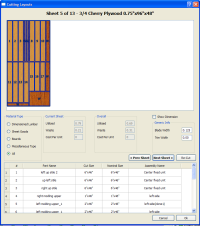 drawings help build it – I get it.
But this is a case, in part, where people put forward a current view of needs or wants and do not move ahead to state their problems in a more encompassing way. And I get that as well — a problem needs fixing. But it’s like stating the problem as cutting a sheet of plywood and finding that a circular saw and straight edge are the solution. But then again you might think a bit more and find a table saw to be better, or a panel saw, or even a CNC machine.
Take the shop drawings from cabinet design software programs. Sure you need drawings. But it would be very nice to also have diagrams to show you how to lay out your parts on the materials to reduce waste. Or reports that allow you to sort by material then into sizes — for example ‘list all parts of 3/4 cherry plywood that are 8 inches wide’. Why? Maybe you can rip them all with the same set up. That saves time.
Or create a list of all boards with a tenon on them — again set it up once, cut it in one process, and maybe save a little more time. And the report should show both the design length and the cut length (taking account of the tenon(s)) to keep you from making the ‘Oh no, it’s too short’ mistake some woodworkers have tell about. So think ahead when considering furniture or cabinet design software. Pick the one that solves more than one problem.