If you make money woodworking, you want SketchList 3D Pro. The added features and reports will save you valuable
time in the shop and dazzle your clients with photorealistic testfits. Pro also enables you to export a DXF
file for input into a CAM system.
SketchList 3D Hobby is designed for casual woodworkers, who want to create nice 3D designs
for planning and sharing with family and friends. See the full comparison of features on our
Pricing page.
SketchList 3D is significantly easier to learn than traditional CAD systems. Past users have generated
complex designs within a day or two of downloading the free trial. For Pro users, we offer a
free JumpStart training session, which gets you designing your first piece in less than an hour.
Yes. SketchList 3D Hobby is ideal for beginner woodworking projects, helping you customize the design to your space and preferences.
Yes. You can design a wide range of furniture, including any type of cabinet or storage unit.
Yes, with our
30-day free trial, you'll have full access to all SketchList 3D design capabilities so you can make faster, easier and smarter woodworking designs.
- After you purchase your copy of SketchList 3D, you will receive your first license key through email.
- Go to the Download Portal. You will need your license key to log in for the first time.
- Download the latest SketchList 3D build, Mac or Windows, depending on your operating system. A free 30-day trial of the Cabinet Wizard is included.
- Find and double-click the app file. (You can typically find this in the downloads folder).
- Follow the instructions to install the software and open SketchList 3D.
- A pop-up should appear with several options; press Activate. In the new window, enter the key and press Web Connection to activate. Once the key is activated, you will be able to use SketchList 3D.
- In case you were using a Trial version, then go to Help and then Enter License Key to enter the key.
No, unlike with V4, the Cabinet Wizard function is set by the same key that you use for your SketchList version. One key – two functions.
You should press the 'Trial' button on the first dialog shown after the launch. The trial version will not require an activation license.
You can download the latest SkecthList version from the
Download Portal.
You must login using your credentials and then you will be able to download the app from the right-hand 'My Products' column.
Yes, you should click on 'More' and then 'Install Anyway'.
You get this notification because our installation packet hasn't been signed with a publisher certificate.
This is common with software you download directly from the creator, and is a false alarm. We take the
security of our software seriously, as our thousands of secure, active users attest.
To use SketchList 3D, ignore this notification and proceed with the download.
To avoid your security software from blocking the app, add your .exe to your antivirus' 'Excluded File list', in this way, it will not block the one time access SketchList 3D needs to register the key.
If your activation key has already been used (because you already activated it on another computer, for example), you will need to generate a new key.
You can generate a new key through our
Download Portal.
- Log in using your credentials
- Go to the 'My Products' tab
- Click the 'Generate New Key' button and a new key will be generated. The old key will be turned off.
- First, you need to export your projects. To do this, go to the 'File' menu item and select 'Export'. You can also export a project from the 'Open Project' window, select the project you want to export and click the 'Export Project' button.
- On the other computer, pick 'Import Project'.
- Select the db3 file with the project you want to import.
- You will then see a confirmation message.
- If anything goes wrong – you can always do a file restore action to bring back the projects.
We require that Mac users run Mac OS 10.13 or higher in order to operate SketchList. Additionally, we would like to make users aware that we do not currently support SketchList Version 4 on MacOS Big Sur.
Pro tip: Don't see your question covered here? Search our
furniture design blog
for detail tutorials! With hundreds of blog articles dating back to 2008. We're bound to have
covered the feature you're looking for.
SketchList 3D supports both imperial and metric units.
There is a library of common pieces included in SketchList 3D, and anything you've created once can be
saved to your custom library. You can also buy a library of appliances as a
separate add-on from our
Pricing page.
No. In order to make SketchList 3D as easy to use as possible, it is not compatible with SketchUp.
Not categorically. As you're designing and moving boards around, occasionally it's necessary
for board to occupy the same space, and restricting this would impede your progress. For example,
a board with a tenon would bump into a board with a mortise. To ensure boards are not overlapping,
check the board spreadsheet for both boards.
Dovetail joinery is applied to the edge of a board. Start by specifying the height and
angle of the dovetail; then dovetail the surface with the shaping tool.
You can take a board and shape it to affect the curve, however you cannot bend wood in SketchList 3D.
We have a clone and space function for holes, so you can take 5-mm or ¼-inch holes and space them every X units.
There are two approaches to dental molding in SketchList 3D. One is to cut non-round
holes and then close and space them over a given distance. The other way
is to clone and space a small block.
Yes. By making any drawer, board, door, or assembly into a standard, you can easily call it into other designs.
Yes. You can import any image file as a texture and adjust the transparency.
Hold down the Control key and the left mouse button and move the mouse to zoom in.
You can also hit the "M" key to open a magnified image. Simply hit "M" again
to close the magnifier when you're done.
Yes. Just follow the steps in this dimensioned shop drawing video.
Check the grain direction of the board and the material to ensure both are going
in the correct direction. If you did not specify a grain direction when you created
the board or material, the SketchList 3D optimizer automatically places the boards
to minimize waste, so you may end up with a board grain that is not going in the direction you intended.
Size the door and rabbet all four edges. At the board-level, click the joinery button.
Select rabbet and pick all four edges.
You can edit the sizes and locations of any part from the form in the upper-right or
the spreadsheet at the bottom of the main form. Another option is turn on red dots,
right-click the red dots on the object, and drag the object into the desired size.
To resolve any issues you might have with the 3D viewer, you will need to update the video-card driver.
Your video-card will vary depending on your computer characteristics.
If you would like to upgrade from SketchList V4 to V5, visit our
website and choose the app that best fits your needs. Go to the 'Upgrades' tab to see the different upgrade options.
Yes, you can manually copy the V4 database, to do this, click the 'Migrate from V4' button located on the 'Open Project' dialog. This button will be visible if an older version of SketchList is detected on the user's machine.
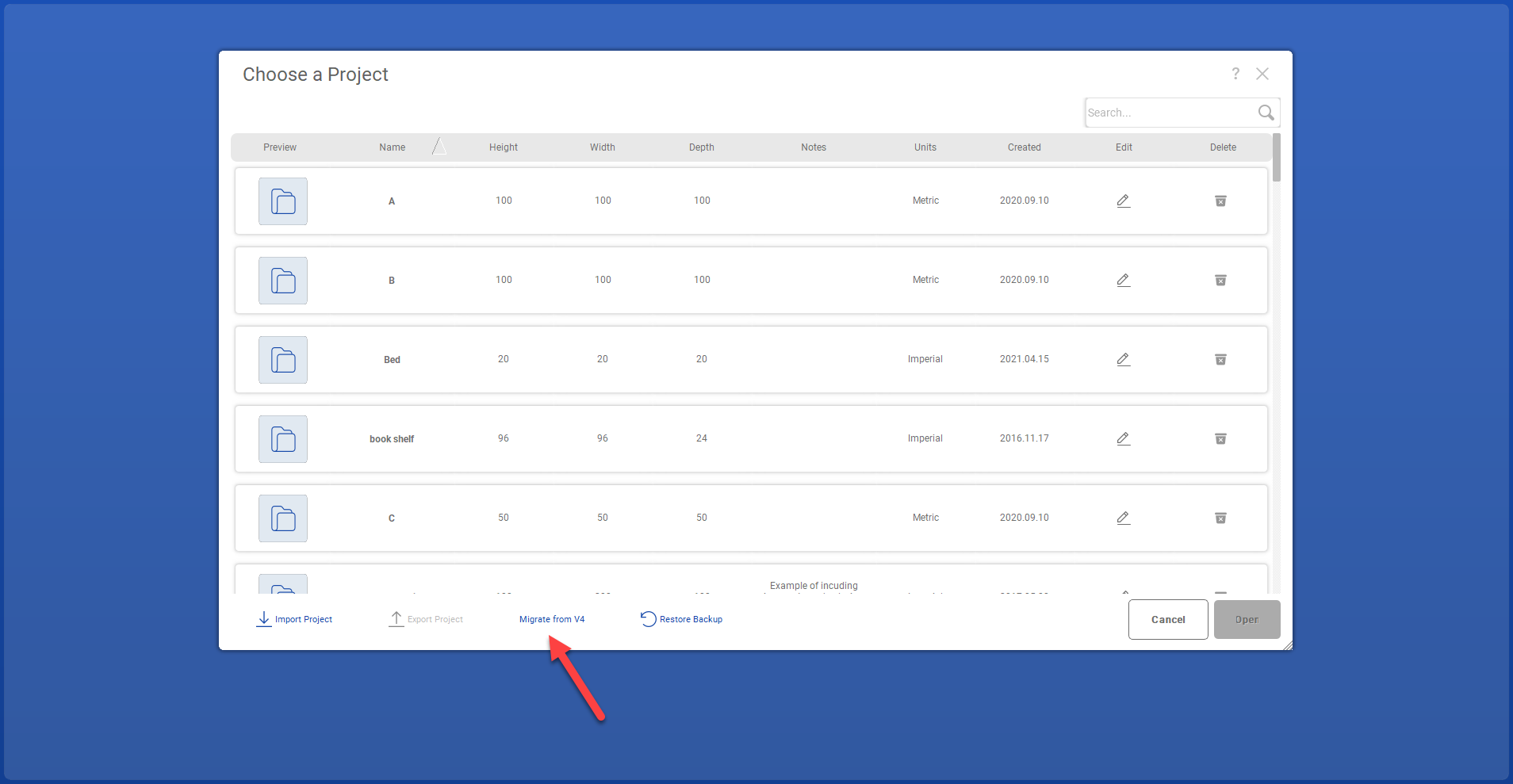
The flow will be as follows:
- Click the 'Migrate from V4' button
- SL V5 attempts to automatically load the `AppData/Sketchlist4/woodworking.local.db3` file into its existing database
- If step 2 is not successful, SL V5 will show a message offering to locate `woodworking.local.db3`(expect the exact name) or cancel.
- Once the process is done, a confirmation or error message will be shown to the user.
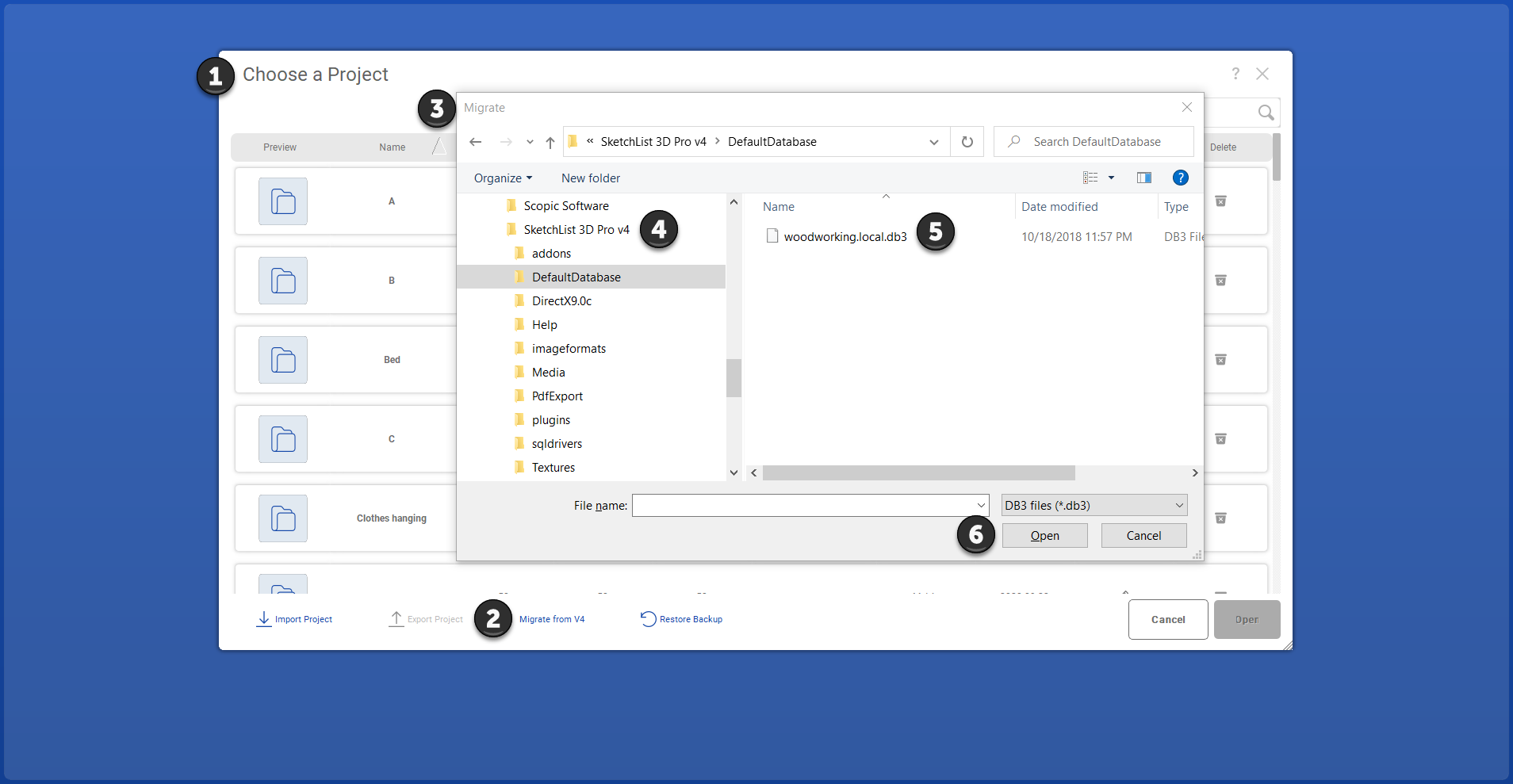
No, you can click the 'Migrate from V4' button located on the 'Open Project' dialog. This button will be visible if an older version of Sketchlist is detected on the user's machine.
First, download SketchList 3D on your new computer. On your old computer, export
all of the projects you want to save onto an external drive. Activation numbers can only
be used once, so you'll need to email us to request a new activation key once you've
uninstalled SketchList 3D from your old device. You can then use this new key to activate
SketchList 3D on your new computer and import your projects from your external drive.
NOTE: One purchase of SketchList 3D licenses you to use the software on one computer
only. Running SketchList 3D on more than one computer is a violation of our licensing
agreement and will result in termination.
Yes. First, uninstall and delete SketchList 3D from your previous computer. Then send
us an email requesting a new activation key.
We are currently designing concepts for an iPad version, which may be made available
in the future. Stay tuned for further updates.